
(Column-by-Column Explanation)

Each row represents one lead.
Checkbox
Select leads for bulk actions.
Top checkbox selects all visible leads.
Name
Click Lead name to open Lead Detail.
Sortable (A–Z / Z–A).
Phone
Shows the primary contact number.
Status (Editable Directly From List)
Status can be updated directly from the list:
Click the status label to select a new status.
Typical statuses:
- New
- Assigned
- Contact in Future
- In Process
- Dead
Changing status updates the lead immediately.
Source
Shows enquiry source, such as:
- IndiaMART
- Google Form
- Cold
- Offline
- Others (based on setup)
Created At
Shows lead creation date and time.
Sortable.
Useful for:
- Daily tracking
- Lead ageing
Remark
Shows the latest remark for quick context without opening Lead Detail.
Assigned User (Editable From List)
Assigned user can be changed from the list:
Click assigned user and select another user.
Ownership updates immediately.
Updated At
Shows last modification date.
Useful for identifying inactive leads.
Row Action Menu (⋮ Three-Dot Menu)
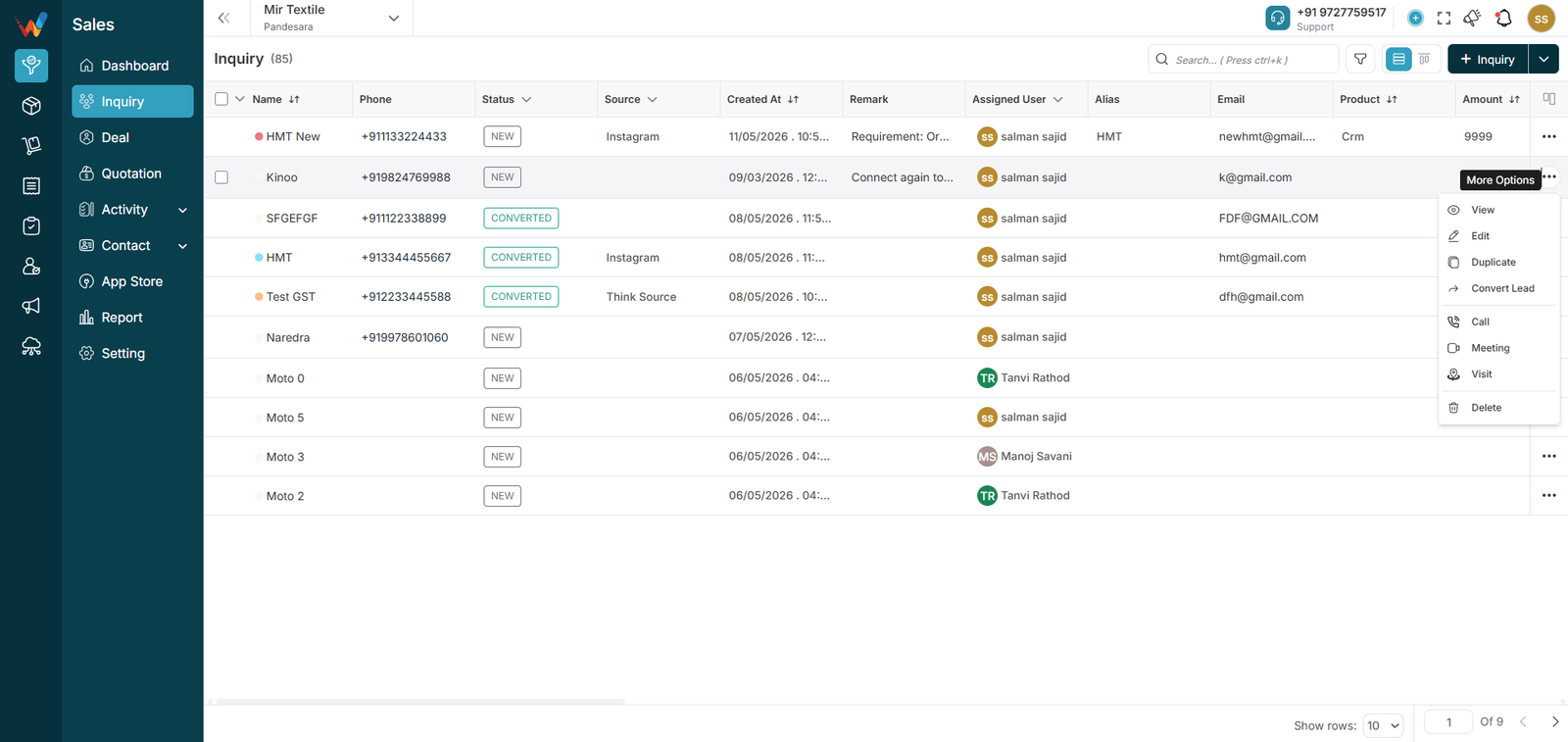
Available Actions
- View
- Edit
- Duplicate
- Convert Lead
- Call
- Meeting
- Visit
- Delete
Action Definitions
View
Opens Lead Detail screen.
Read-only if permissions are restricted.
Edit
Opens Edit Lead form.
Editable fields commonly include:
- Lead name
- Business name
- Status
- Product
- Contact details
- Source
- Other configured fields
After saving, the table updates immediately.
Duplicate
Creates a copy of the existing lead:
- Same details
- New ID
- Status reset to default
Used for repeat leads.
Convert
Converts a lead into a deal:
- Lead details are carried forward
- New deal ID is created
- Stage may be selected as required
Used for qualified leads that are ready to enter the revenue pipeline.
Call / Meeting / Visit
Opens the relevant logging panel linked to the lead.
After saving, the activity appears in Lead Activities.
Delete
Deletes the lead (typically with confirmation).
After confirmation, the lead is removed permanently.