
Introduction to Transfer Module
The Transfer module is used to move stock between warehouses or branches.
1.1 Common Use Cases
- Stock movement between branches
- Warehouse stock movement
Transfer – List View
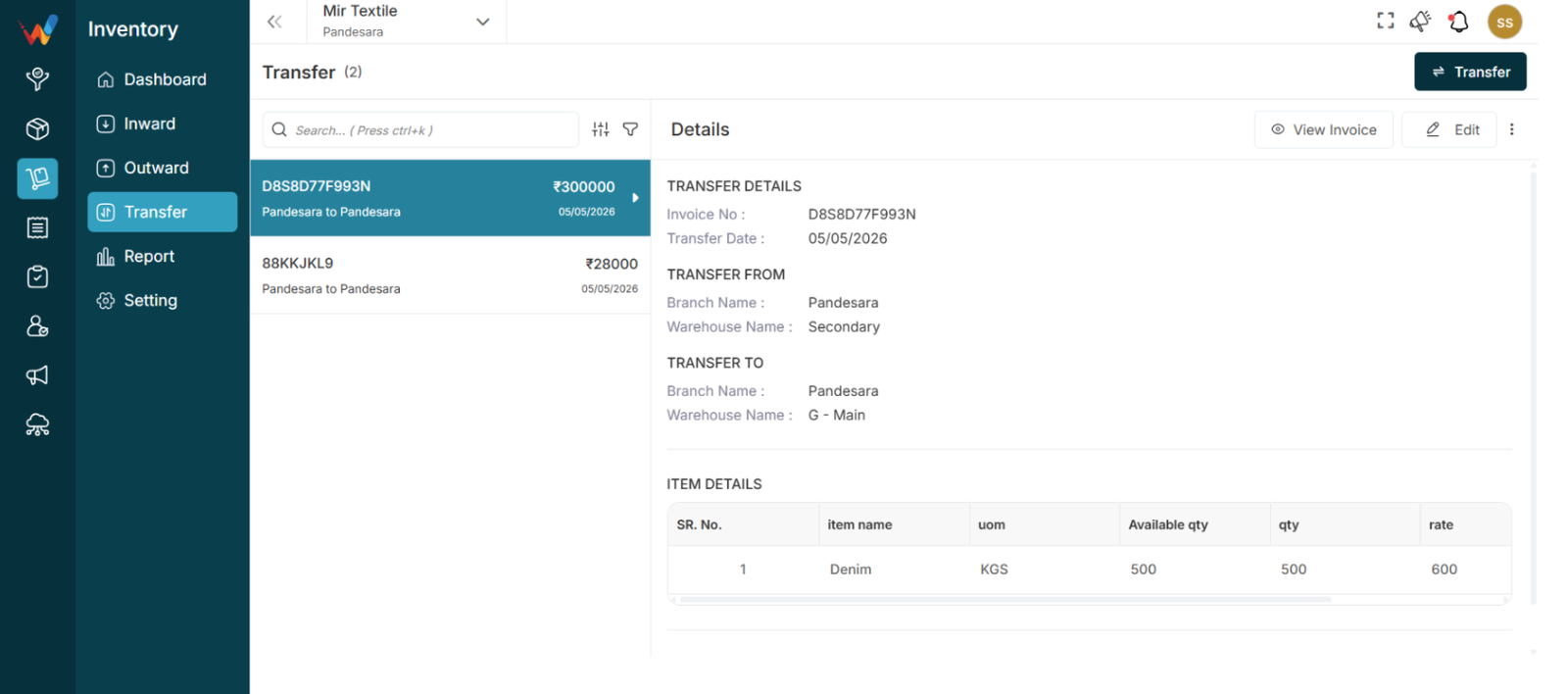
Navigation Path:
Inventory Module → transfer
2.1 Purpose of Transfer List View
Displays all stock transfer entries. Each entry typically includes:
- Invoice Number
- Transfer Direction
- Amount
- Date
2.2 Transfer Direction
The Transfer Direction shows the movement of stock between locations.
Explanation
Stock moved from one location to another location.
Example
If the record displays HQ to Surat, then:
- Stock moved from HQ
- Stock moved to Surat
If the record displays Surat to HQ, then:
- Stock moved from Surat
- Stock moved to HQ
Purpose:
Provides instant visibility of stock movement without opening details.
2.3 Search Bar
Used to quickly find transfer records.
Shortcut: Ctrl + K
How to Use
- Enter Invoice No or Amount.
2.4 Sort Function
Used to arrange transfer records.
Available Options
- Invoice Date
- Transfer Date
- Updated Date
- Voucher Number
- Amount
Sort Order
- Ascending
- Descending
Apply: Confirms sorting
Reset: Clears selection
Purpose:
Helps organize transfer records easily.
2.5 Filter Panel
It helps you find exactly what you’re looking for by filtering out unnecessary results.
Available Filters
- Item Name
- Amount
- Transfer Date
How to Use
- Open the Filter Panel.
- Enter filter details.
- Click Submit.
- Click Reset to clear filters.
Purpose:
Allows viewing only relevant transfers.