
1.1 Subject
Call title.
Examples:
- Initial Call
- Call Skipped
- Follow-up
Clickable and usually opens the detailed view sidebar.
1.2 Parent
Indicates the entity type linked to the call, such as:
- Lead
- Cold
- Deal
Purpose:
Helps understand the call context and where the activity belongs.
1.3 Linked To
Shows the person or deal name (example: ABC).
Clicking may open the linked Lead or Deal detail screen.
1.4 Phone
Phone number used for the call.
Important when a contact has multiple numbers.
1.5 Direction
Indicates call direction and type:
- Incoming → client called
- Outgoing → team called
- Missed → not answered
Used for:
- Sales performance analysis
- Call behavior reporting
1.6 Start Time
When the call started.
1.7 End Time
When the call ended.
Used to verify the actual call window.
1.8 Duration
Call duration.
Examples:
- 00:00:01
- 00:00:06
Very short duration often indicates a missed or rejected call.
1.9 Response
Selected outcome of the call.
Examples:
- Interested
- No Response
- Call Later
- Not Answering
Why it matters:
Critical for follow-up planning and outcome reporting.
1.10 Date
Date of the call.
Used for daily productivity reports.
1.11 Summary
Short note entered while logging.
Helps users understand context without opening details.
1.12 Created By
User who logged the call.
Used for tracking salesperson activity.
1.13 Attendees
Mostly relevant for meetings.
For calls, this may remain blank in many setups.
1.14 Updated By
User who last modified the call entry.
1.15 Created At
Timestamp of record creation.
1.16 Updated At
Timestamp of last update.
1.17 Row Action Menu (⋮)
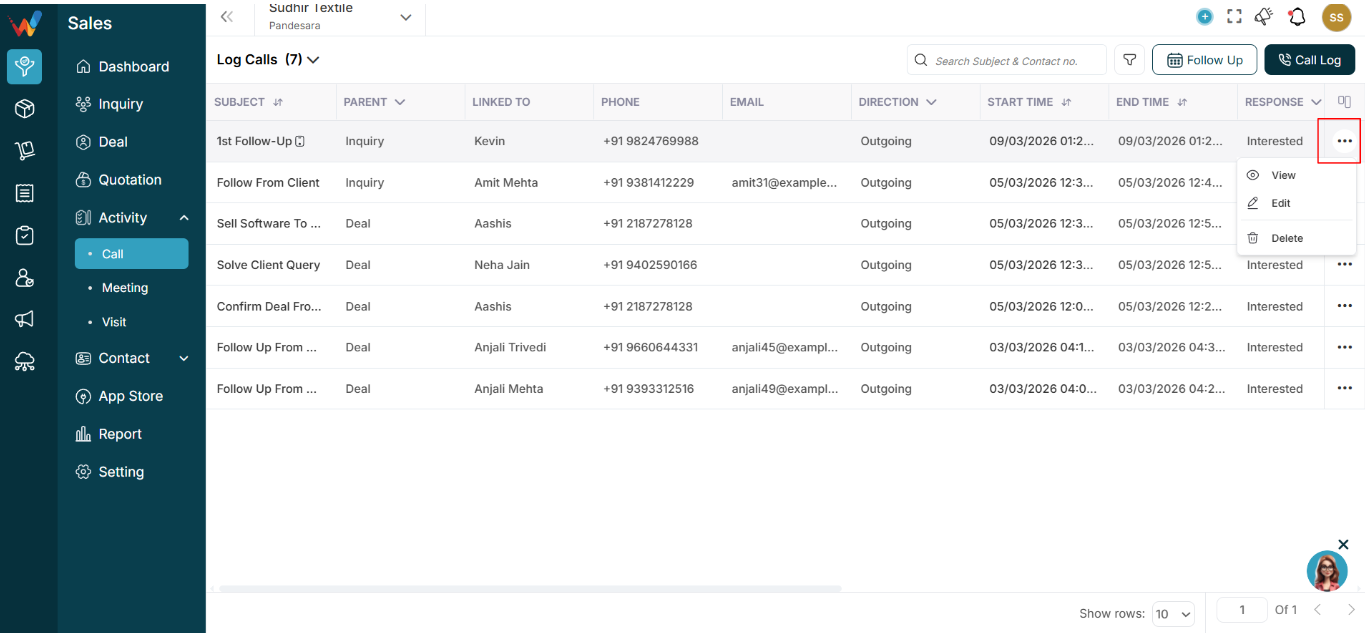
may include:
- View
- Edit
- Delete
Availability depends on permissions (RBAC).