
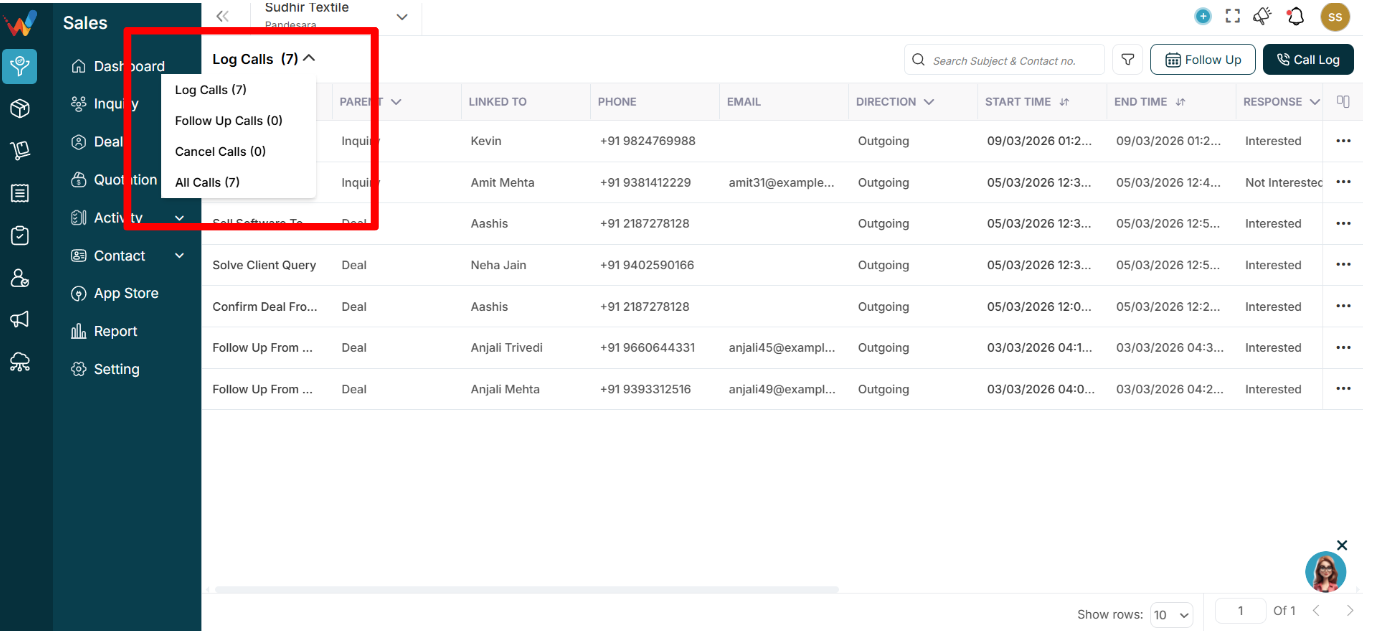
1.1 What Is This Dropdown?
This dropdown filters calls by activity type and status (completed vs scheduled vs cancelled).
1.2 Available Options
1) Log Calls (7)
Shows:
- Only completed call logs
- Calls that already happened
- Incoming, outgoing, and missed calls
This is usually the default operational view.
2) Follow Up Calls (0)
Shows:
- Scheduled future calls
- Planned calls that are not completed
- Calls created via the Follow Up flow
Used for:
- Checking upcoming calls
- Managing pending follow-ups
If count is 0, there are no scheduled calls.
3) Cancel Calls (0)
Shows:
- Calls that were scheduled but later cancelled
- Activities marked as cancelled
Useful for:
- Monitoring dropped follow-ups
- Reviewing potential missed opportunities
4) All Calls (7)
Shows:
- Log calls
- Follow-up calls
- Cancelled calls
(All combined)
Best for:
- Full historical view